
Your dive photos went blue.
Get the color back.
Water swallows red light in the first few metres, so every underwater photo drifts blue or green. This free tool rebuilds the missing colors right in your browser. Nothing gets uploaded.
Drop in a photo from your last dive or snorkel trip. The tool reads the color cast, rebuilds the red channel, and shows you a before and after you can drag. Fine-tune it, then download the fixed photo.
Photos are fixed in your browser. Nothing gets uploaded.
5 of 5 free photos leftThree steps, no editing skills needed
- 01
Upload a photo
Pick any JPG or PNG from a dive, snorkel, or pool session. It stays on your device, so even weak hotel wifi is fine.
- 02
Automatic color fix
The tool measures how starved the red channel is, rebuilds it from the greens and blues, then stretches the contrast back. You see the result instantly.
- 03
Tune and download
Nudge strength, warmth, brightness, contrast, and color with five sliders, then download the full-resolution photo. The open water stays blue, not pink.
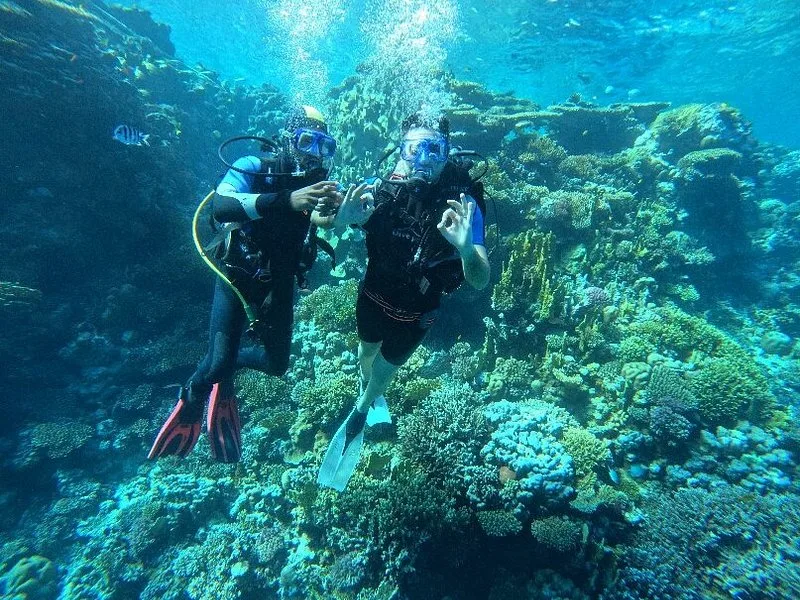 Before
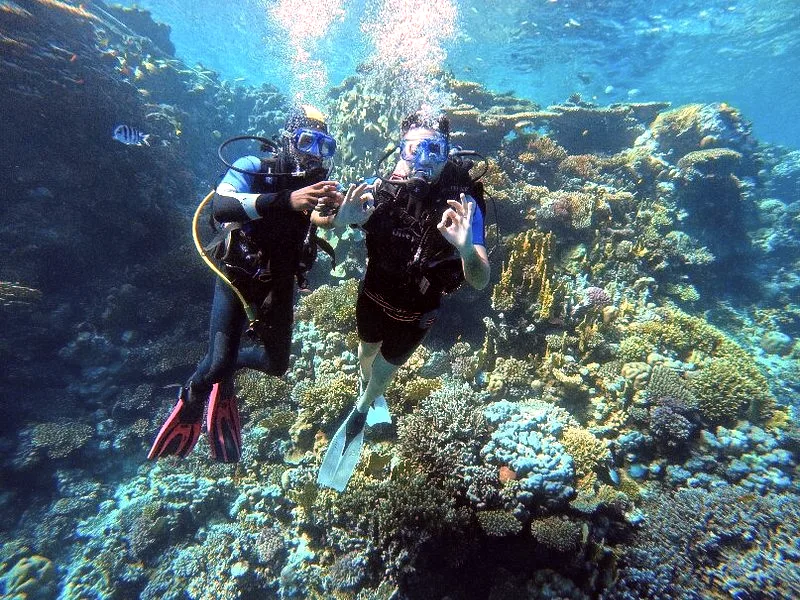 After
AfterWhy underwater photos turn blue
Sunlight is a mix of colors, and water absorbs them at different depths. Red is the first to go. By 5 metres it is almost gone, which is why a bright red fish looks brown-grey on your camera. Orange fades next, then yellow. Blue and green travel deepest, so that is the cast every photo ends up with.
Turning up the warmth does not fix it, because there is barely any red signal left to boost, only noise. The tool rebuilds red from the color information that did survive, then protects the open water so it stays blue instead of turning magenta. That is the same idea the paid dive apps use, done here for free.
- ≈ 5 m
- Red is gone. Reds already read as grey-brown.
- ≈ 10 m
- Orange fades out. Skin tones go flat.
- ≈ 20 m
- Yellow disappears. The whole scene reads blue-green.
Every photo is processed on your device. Nothing is uploaded to a server.
Underwater photo questions, answered
- Why do my diving photos look blue or green?
- Water absorbs red light first, then orange and yellow. Past a few metres your camera only records the blues and greens that reach that depth, so the whole photo takes on a cold cast. It is physics, not a broken camera.
- Do I need a camera with a red filter?
- A red filter or a video light helps at the moment you shoot, but it cannot bring back color the water already removed at depth. Correcting afterwards, the way this tool does, works on photos you already took without any filter.
- Are my photos uploaded anywhere?
- No. The whole correction runs in your browser on your own device. Your photos never leave your phone or laptop, which also means it works on slow hotel wifi.
- It says my iPhone photo cannot open. What do I do?
- iPhones save in HEIC, which browsers cannot read directly. On your iPhone open the photo, tap share, choose Save as JPG (or email it to yourself), then upload the JPG here.
- Can you take photos for me on a dive?
- Yes. On our Hurghada boat dives the guide can shoot photos and video of you underwater, already color-corrected, so you go home with shots worth keeping. Ask when you book.
Come back with better photos
Book a dive or snorkel day in Hurghada and the guide can film you underwater. Real color, no blue cast, nothing for you to fix.